How to read the GTA 6 map
Match what you see on screen to the map Index, HUD gauges, and markers.
Last checked
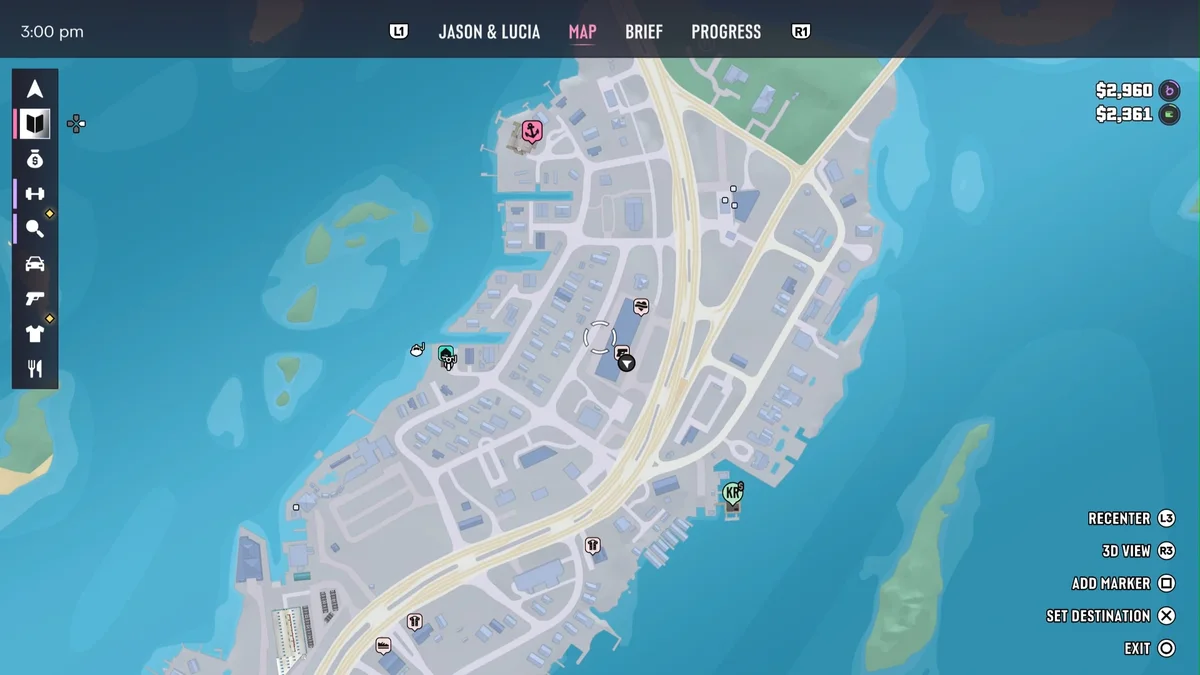
How do I read the map?
Open the map and press D-pad Right to browse the Index. Pick a category, then a discovered location. The destination and its route appear on the map. On the road, compare your position with the route on the minimap.
No matches. Try a shorter name or location.
Map controls
- TouchpadViewOpen the map
- TouchpadView On the default control assignment, open the full map. Press D-pad Right to expand the index. This button can be reassigned in Settings. GTABase · GTABase · GamesRadar+
 Active destination
- Turquoise waypoint pin Select a location and press CrossA. A new destination replaces the current one. GTABase · GamesRadar+
- SquareXPersonal markers
- Add Marker prompt on the full map Press SquareX over a spot to leave a reminder. You can keep several markers alongside your active destination. GamesRadar+ · GTABase
- R3RS clickInspect the map view
- Recenter and 3D View prompts On the full map with the index collapsed, press L3LS click to recenter and R3RS click for the 3D view. In Quick Navigation the same R3RS click press picks a destination. GamesRadar+
Map index
 Personal
- Arrowhead Locate your residence, registered vehicles, owned garages and cash-deposit points. GamesRadar+ · GTABase · GamesRadar+
 Story
- Open book Read the next story objective or expand the optional tasks. Select a task for its instructions. GamesRadar+ · GTABase
 Robberies
- Money bag Find discovered opportunities including banks, vehicle deliveries, hold-ups and gang sites. GamesRadar+ · GTABase
 Activities
- Dumbbell Look up leisure and training sites such as races, gyms, golf, fishing and the shooting range. GamesRadar+ · GTABase
 Exploration
- Magnifying glass Browse points of interest, optional investigations, collectors and jump locations. GamesRadar+ · GTABase
 Vehicles
- Front of a car Find garages, mod shops, fuel, chargers and transport hubs. Start here for service or a ride. GamesRadar+ · GamesRadar+
 Weapons
- Handgun Browse the discovered Ammu-Nation shops by their stock specialty. GamesRadar+ · GTABase
 Style
- T-shirt Locate clothing, electronics, footwear, hair and tattoo shops. GamesRadar+ · GTABase · GameSpot
 Food & Drink
- Fork and knife Find convenience stores, fast food, bars, cafés and liquor stores. GamesRadar+ · GTABase
Map markers
 Newly discovered
- Small gold or orange diamond An index category or entry has something new. Open it to see what changed. GTABase · GamesRadar+
 Time-sensitive task
- Hourglass beside a task Check this task before sleeping or advancing the clock. Its availability can expire. Illustrated example. GamesRadar+ · GameSpot
 Main story lead
- Pink mission icon Open Story and select the pink entry to read its objective. A waiting task can remain in this list without a destination on the map. GTABase · GamesRadar+
 Optional mission
- Dark icon with pink lettering Select the optional errand in Story and read its conditions. An hourglass on a task means its window can expire. Illustrated example. GTABase · GamesRadar+
 Mission route
- Pink line on the minimap Follow the route to the current mission location. A pink objective can also indicate a person, item or arrival point, depending on the task. Illustrated example. GTABase · GTABase
 Personal vehicle
- Turquoise car The registered vehicle for the current protagonist. Look in Personal to locate it. GTABase · GamesRadar+ · GameSpot
 Unowned vehicle
- Gray car The last unregistered vehicle you drove. It can disappear when lost or destroyed. GTABase · GamesRadar+ · GameSpot
 Standout vehicle
Places and activities
 Shooting range
- Target silhouette Shooting-range activity. Training here can extend Focus capacity. GTABase · GamesRadar+
 Fishing
- Fish silhouette Fishing opportunity. Landing fish also builds Focus. GTABase · GamesRadar+
 Grocery store
- Shopping basket Shop for supplies including Zombix, which restores health. GTABase · GameSpot
 Gym
- Dumbbell on a blue tile Use strength equipment to increase maximum health or train cardio for stamina. GTABase · GTABase · GameSpot
 Ammu-Nation
- Handgun on a pink tile Equipment shop. Buy body armor here or use the green locker to manage owned weapons. GTABase · GameSpot
 Pay ’n’ Spray
- Spray gun on a pink tile Vehicle paint and service shop. Available services depend on the car. GTABase · GTABase · GameSpot
 Garage
- Garage door on a turquoise pin A garage. Each parking spot inside lets you register one more vehicle. GTABase · GTABase
 Bank
- Bank building on a green pin A bank you can rob. It pays in marked bills, which need the Dye Pack Jammer and a fence. GTABase
 Payday loan
- Hand holding a dollar sign on a green pin A payday loan office you can rob. It pays in marked bills, like a bank. GTABase
 Fence
- Lock-up with a dollar sign on a pale green pin A buyer for stolen goods. Hover over the icon to see what they pay for each type of loot. GTABase
 Gang hideout
- Balaclava on a yellow pin An Illegal Operation run by a gang. It appears when you enter its area and can be cleared for its valuables. GTABase
 Safe
- Safe door on a white pin A safe you can open, either with a code found nearby or by cracking it. GTABase
 WAiNK curiosity
- Magnifying glass on a dark pin An odd sight you can scan with the WAiNK app. There are 35. GTABase · IGN
 ATM
- Hand at a cash machine Withdraw money or transfer pocket cash to the current character’s BuckMe account. GTABase · GTABase
 Weapon locker
- Locker with a gun Manage stored weapons and reclaim eligible gear at this locker. The green locker inside an Ammu-Nation is one place to check. GTABase · GameSpot · GTABase
 Electronics shop
- Headphones on a pink tile Look under Style for an electronics store. Buy headphones here for listening on foot. GameSpot · GamesRadar+ · GTABase
 Safehouse
 Golf
 Pool
 Barber
 Mod shop
 Clothing store
Player and vehicle HUD
 Health
- Pink heart Tap D-pad Down to see current health. Natural recovery stops at the white line. A healing item or sleep can restore health beyond that point. GTABase · GameSpot · GameSpot
 Buffed health
- Pink heart with a ring A temporary increase to health capacity. Getting wasted or starting a new session ends this buff. GTABase · GameSpot
 Adrenaline
- Gold heart with a ring A short-duration boost to the character’s stats. GTABase · GameSpot
 Focus
- Purple eye and bar Click both sticks to activate Focus. Combat Focus uses this reserve. Exploration Focus leaves it available. GTABase · GameSpot
 Buffed Focus
- Purple eye with a ring The character has temporarily increased Focus capacity. GTABase · GameSpot
 Fuel level
- Gas pump in a colored circle Tap D-pad Down while driving to show vehicle information. On a gas vehicle, green means fuel is high, yellow means low, and red means nearly empty. An EV uses a separate charge icon. Find gas or chargers under Vehicles. Illustrated example. GamesRadar+ · GTABase
 Engine condition
- Colored meter beside the fuel indicator Green means good condition, amber signals moderate damage, and red signals critical damage. A red icon with a cross means the engine has failed. Illustrated example. GamesRadar+ · GTABase
Wanted stars
 Police responding
- Flashing star indicator An in-game report has reached police. Responders are heading to the scene. GTABase
 Suspect unknown
- Hollow white star Police know about an incident but have yet to identify the player. GTABase
 In pursuit
- Solid white star Officers currently have the player in sight. More stars indicate a higher wanted level. GTABase · GamesRadar+
- Visual lost
- Flashing star after a pursuit Police lost sight of the player but the search remains active. Context distinguishes this from the initial response. GTABase
 Residual heat
- Solid red star The immediate pursuit ended. Recognition clues still apply within the marked area. GTABase · GamesRadar+ · GameSpot
 Heat, suspect unknown
- Hollow red star Local heat persists, but the police lack a description of the player, their partner and their vehicle. GTABase
 Player position known
- Bright white circular player arrow During a search, the minimap’s player arrow indicates that police know your current position. GTABase
 Player hidden
Heat clues
 Appearance recognized
- Head silhouette in a red circle Police have a description of the on-screen character’s appearance. GTABase · GameSpot · GamesRadar+
 Partner recognized
- Two profiles in a red circle Witnesses identified the protagonists as a pair. GTABase · GameSpot · GamesRadar+
 Outfit recognized
- Clothes hanger in a red circle The current clothing is on the police description. GTABase · GameSpot · GamesRadar+
 Vehicle recognized
- Car in a red circle The vehicle being driven is associated with the incident. GTABase · GameSpot · GamesRadar+
 Visible weapon
- Handgun in a red circle A visible weapon is part of the character’s current heat information. GTABase · GameSpot · GamesRadar+
 Recorded by CCTV
- Surveillance camera in a red circle The game has flagged local camera evidence for this incident. GTABase · GameSpot · GamesRadar+
 Recorded by cloud CCTV
- Camera and cloud in a red circle The venue’s footage is stored remotely. This evidence persists even if you leave the building. GTABase
Vehicle scanner
 Vehicle alarm
- Red shield with an alert mark The scanned car has an alarm. The same red shield can appear beside the door interaction prompt. GTABase · GameSpot
 Standard tracker
- Gold location pin with radiating arc The scan identifies a standard tracker. The yellow tracker indicator can also appear above the minimap while driving. GTABase · GameSpot
 Advanced tracker
 Locked vehicle
 Keyless vehicle